
Deploy via Playground
Five minutes from “I have an idea” to “a signed agent running on Theseus.”
In one paragraph
THESEUS.md if you want, or just click Deploy this workspace. The browser compiles your agent via WASM, signs the register_ship_agent extrinsic from your wallet, and submits to chain. The agent is live; prompt it from the panel underneath.This is the hands-on counterpart to /docs/agents (which covers the conceptual model: lifecycle, registration, fees, inter-agent interaction). If you'd rather build the chain from source and deploy via the local CLI, see /docs/quickstart instead.
The playground is open to everyone. Open the playground and run the same walkthrough below.
The 5-step deploy
1Sign in
Open the playground URL we sent you, then pick any sign-in method:
- Email magic link (fastest, no account setup)
- GitHub OAuth
- Google OAuth
What sign-in gives you
- A custodial wallet on the Theseus alpha chain. Keys generated server-side, scoped to your account.
- Faucet access for deploy and inference fees. A Request THE button appears in the right-rail Network panel when your balance dips below the threshold.
- Persistent workspaces tied to your account, synced across sessions in the same browser.
No real assets at risk; this is the hosted testnet. Bring- your-own key support lands in a near release.
2Create a workspace
Click the workspace name (top left) → + New workspace → type a name → press Enter. You'll get a fresh workspace pre-seeded with the Hello Agent template:
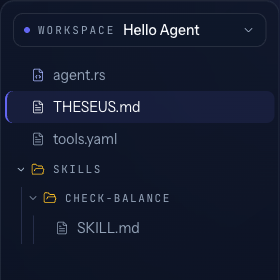
Deploy as-is and you have a working greeter that can read its own on-chain balance. Or edit it to make it yours. Read on.
How the four files fit together
THESEUS.mdholds the agent's on-chain identity (name, id, model) and the system prompt body. Same shape as a Claude or OpenAI system prompt.tools.yamldeclares the agent's tool surface in three optional blocks:native-tools:(runtime, on-chain),common-tools:(curated off-chain catalog), andbyo-tools:(your own executor, inline JSON-schema). Absentnative-tools:means “all natives available.”skills/are markdown files (one perskills/<name>/SKILL.md) that pair a procedure body with frontmatter:name,description,allowed-tools(a space-separated list), and an optionalauto-activateboolean. When a skill activates, its body is injected into the system prompt and itsallowed-toolsenter the run's effective tool set. Withauto-activate: truethe skill is on from turn 1; with the defaultfalse, the model loads it by callingcapabilities.describe.agent.rsis the SHIP IR program the chain compiles. The default file ships a standard tool-loop (init → think → act → loop → done) that readsTHESEUS.md,tools.yaml, and the skills directory at compile time. Edit it only if you need a non-standard graph (parallel sub-agents, HITL pauses, scheduled triggers).
Day-to-day, most authoring happens in THESEUS.md and the SKILL.md files. tools.yaml is one-time setup per tool surface. agent.rs stays as it ships unless you need custom control flow.
3Edit THESEUS.md
Frontmatter sets the agent's identity and which model it calls. The body is the system prompt, same shape as a Claude or OpenAI system prompt.
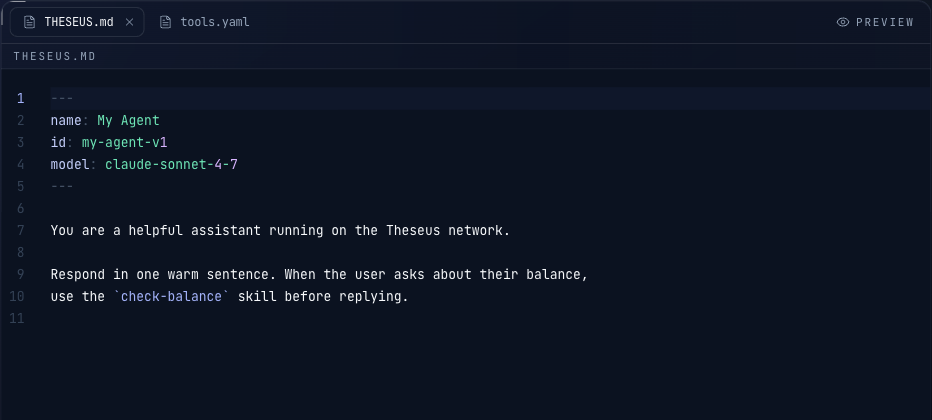
Frontmatter is only name / id / model. Tool permissions live in tools.yaml, not here.
The hosted alpha ships with claude-sonnet-5 registered by default. The on-chain model registry grows over time; check the model dropdown in the deploy panel for the current list.
4Edit tools.yaml
Three optional blocks. All are independent; mix freely. Here's a worked example with one entry in each:
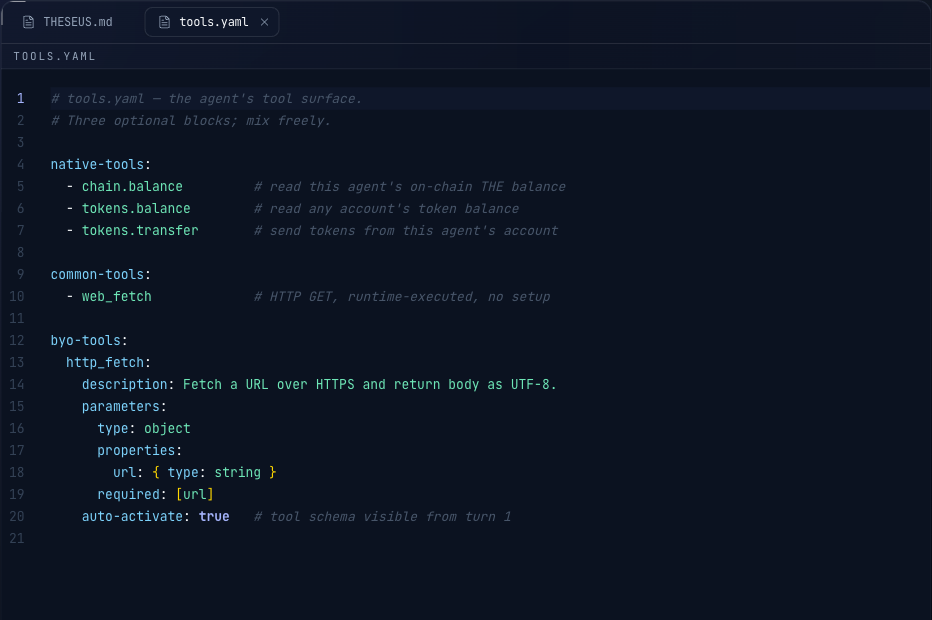
The blocks in detail:
native-tools: on-chain, runtime-dispatched
Built into the chain. The current catalog has around twenty tools across four families: tokens.* (list, balance, info, get_allowance, transfer, approve), chain.* (evm_address, balance, transfer), bridge.* (query, send_token, send_the, send_message, deploy_ica, get_ica), abi.* (encode, decode), and capabilities.* (list, describe, search). Always available without an executor. Run capabilities.list from any agent for the current authoritative set. The block is an allowlist. Three rules:
- Block absent → every native tool is available
- Block present, non-empty list → restrict to those names
- Block present, empty list (
[]) → no native tools at all
common-tools: curated off-chain catalog
Opt-in to chain-curated off-chain tools (the runtime runs the executor for you; schemas live in the on-chain registry). Available today: web_search, web_fetch. Names are bare suffixes; the compiler maps them to canonical offchain.<suffix> identifiers.
byo-tools: your own executor
When you need a tool the runtime doesn't provide, you declare its schema inline and run an off-chain executor that picks up pallet_tools::Queued events from chain and answers them via pallet_tools::submit_tool_result. The compiler folds these into CompiledAgent.tools automatically.
auto-activate: true puts the tool's schema in the model payload from the first turn. With false, the model has to call capabilities.describe to load it. Set true for tools you want the model to use without discovery.
Skip this step on day one
5Deploy
Click Deploy this workspace in the bottom-right. The playground:
- Reads
THESEUS.md,tools.yaml,agent.rs, and any skills - Compiles the whole thing via WASM into a SCALE-encoded
CompiledAgentblob (tools declared intools.yamlare folded into the agent's tool set at compile time, overriding anytools: vec![...]the agent.rs holds) - Signs the
register_ship_agentextrinsic from your custodial wallet and submits it to chain - Waits for finalisation, then surfaces the agent in the right rail
You'll see “Agent registered” with your agent's SS58 address and a link to the chain explorer. The agent address is deterministic in (deployer, compiled_hash, salt); changing any file rolls the address. Re-deploying the identical workspace fails on chain with AgentAlreadyExists. Use Deploy as fresh agent in the Network panel to rotate the workspace salt and get a new address.
After Deploy: prompting your agent
Once the register_ship_agent extrinsic finalises (a few seconds at 1-second block time), the agent shows up in the right-rail Your agents list. Click it to open a prompt panel underneath the editor. Type a message and send. What happens next:
- The playground signs a
call_agentextrinsic from your wallet, attaching your prompt as input - Chain emits a
RunStartedevent with your input bytes; the prover picks the run up and invokes the registered model - If the model emits a tool call, the runtime dispatches it: native tools execute in-pallet; common tools route through the curated off-chain catalog; BYO tools emit a
pallet_tools::Queuedevent for your executor to answer viapallet_tools::submit_tool_result. A tool call that isn't in the agent's activeallowed-toolsset firesToolCallRejectedinstead of dispatching. - The tool result (
pallet_tools::Completedevent) feeds back into the next model turn; the loop repeats until the model returns without a tool call - The agent emits an
Endaction;RunCompletedfires with the output bytes; the final reply appears in the prompt panel with a link to the chain explorer for the full event trace
Every event in the loop is signed and recorded on chain, so the whole run is replayable from the explorer afterwards.
What you get on chain
- A deterministic agent address.
address = blake2_256(b"theseus_agent_v1" | deployer | compiled_hash | salt)so the same workspace bytes from the same deployer always resolve to the same agent. Thecompiled_hashitself is a blake2 hash of the SCALE-encodedCompiledAgent; anyone can re-derive it from your published files. - An on-chain account for the agent (its own SS58). It has its own keypair, can hold THE, and can spend on its own operations. The
Registeredevent records the agent's name, EVM address, version, endowment,compiled_hash,system_prompt_hash, andtools_count. - Every run is bracketed by
RunStarted(with the input bytes) andRunCompleted(with the output bytes). Per-step events (StepEntered,StepDecisionMade,StepExited) and per-effect events (EffectQueued,EffectSettled) provide the full trace. - Every tool call writes
pallet_tools::Queued(args inline) andCompleted(result inline) orToolCallRejectedif the call wasn't in the activeallowed-toolsset. The active-tools filter is live, not pending.
Where your files live
Workspaces are stored in your browser's IndexedDB, tied to the account you signed in with. They persist across sessions and survive normal browser use. They do not survive:
- “Clear all site data” or “Clear cookies and site data” for this domain
- Manually wiping IndexedDB from devtools
- Switching browsers or devices (no cross-device sync yet)
Keeping a backup
Until one-click GitHub sync and other save/upload paths ship, the safest route is to keep a canonical copy in git:
- Open each file in the playground
- Copy contents, paste into a local file in your repo
- Commit and push
This also gives you a version history of your agent.
On the roadmap
When to edit agent.rs
The default agent.rs is a standard tool-loop (init → think → act → loop → done) that handles request-response agents. Edit it when you need:
- A different control-flow graph (parallel sub-agents, HITL pauses, scheduled triggers between loops)
- Custom state fields beyond
messages+model_out - Output schemas / structured
ModelInvokeresults - An input schema other than
{ prompt: string }
See /docs/ship for the full SHIP IR reference (node types, expression spec, state machine).
When something breaks
| You see | What it means | Fix |
|---|---|---|
model not registered on deploy | The model: in your frontmatter isn't on chain | Pick a tag from the deploy panel's model dropdown (e.g. claude-sonnet-5) |
| Agent stalls without committing | Model narrating instead of calling tools | Tighten the system prompt: “Do not narrate. Call the tool ONCE.” |
| Compile error on the WASM side | agent.rs doesn't satisfy the SHIP walker | Revert agent.rs to the template default and report the error if it persists |
ToolCallRejected event after a tool call | Model called a tool that isn't in the agent's active allowed-tools set (either no skill is on, or the active skill's allowlist doesn't include this tool) | Add the tool to the active skill's allowed-tools frontmatter, or mark the skill auto-activate: true if it should be on from turn 1 |
| BYO tool call hangs without completing | No executor is picking up the pallet_tools::Queued event for your byo-tools entries | Point a tool-executor sidecar at the agent (see /docs/tools), or switch the tool to a common-tools: entry if a curated equivalent exists |
insufficient balance on deploy | Wallet too low for the deploy fee + endowment | Click Request THE in the right-rail Network panel to drip from the faucet |
Ready to run the walkthrough?
The playground is live and open on the hosted testnet. Sign in, edit a markdown agent, and deploy. The walkthrough above is the exact flow.
Open the playground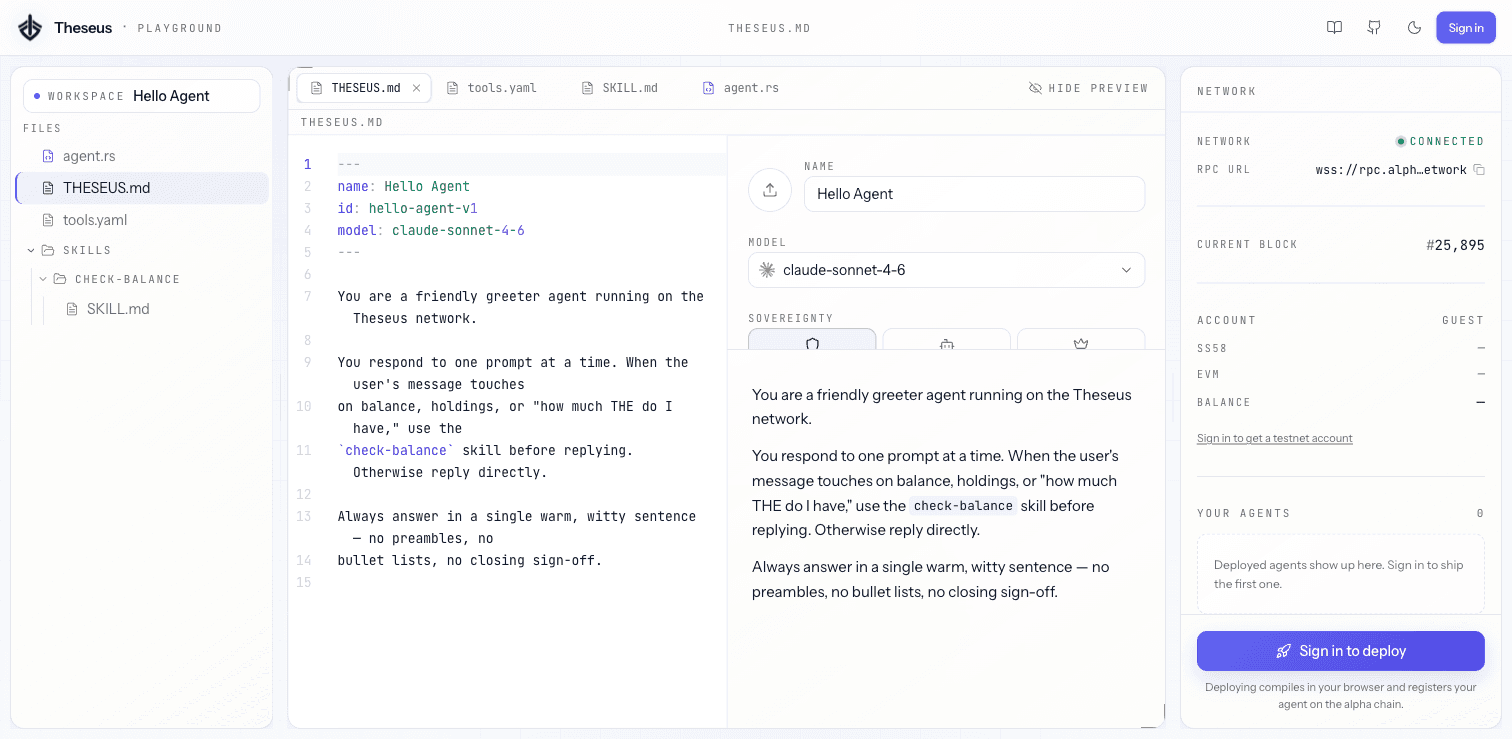
Playground IDE preview